
In these two weeks, we were introduced to flowcharts——a brilliant way to use a diagram to illustrate the sequence of operations to be performed to solve a problem. We learned how to draw a flowchart by learning the symbols of flowcharts. Then we practiced our skill in making flowcharts by doing some exercises and making a poster of a flowchart to solve a problem that we face in our daily life. In addition, we also did the typing test for this month.

Flowchart Symbols
The symbol for “start” or “end” is an oval or a circular rectangle. Only one flow line should come out of a start symbol, and no flow line should enter it. Only one flow line should enter an end symbol, and no flow line should come out of it.

The symbol for “process” is a rectangle. Only one flow line should come out of a process symbol.

The symbol for “input” or “output” is a parallelogram.

The symbol for “selection (decision)” is a diamond shape. Only one flow line should enter a selection symbol, but two flow lines (one for “yes” and one for “no”) should come out of the decision symbol.

There should be a “trigger” to start the flowchart. The direction of the flow should be top to bottom and left to right.
IF, IF-ELSE, IF-ELSE-IF, Nested IF, and Looping (While and Do-While)
IF and IF-ELSE statements in the pseudocode can be represented in a flowchart by a selection symbol. For IF statement, one of the two flow lines that come out of the symbol goes to an outcome while the other goes directly to end symbol. For IF-ELSE statement, both of the two flow lines go to two separate outcomes and then goes to end.


For IF-ELSE-IF statements, there are several selection symbols. The flow line which represents “yes” goes to an outcome while the flow line which represents “no” go to another selection symbol. The same process is repeated until the last selection symbol. For the last selection symbol, “no” also goes to an outcome. Then, all the outcomes go to the end symbol.

The difference between IF-ELSE-IF statements and Nested IF statements is that, for IF-ELSE-IF statements, choice “no” goes to another selection symbol, while for Nested IF statements, the answer “yes” goes to another selection symbol. The answer “yes” represents “if inside if”, and that’s why this kind of statements are called “Nested IF statements”.
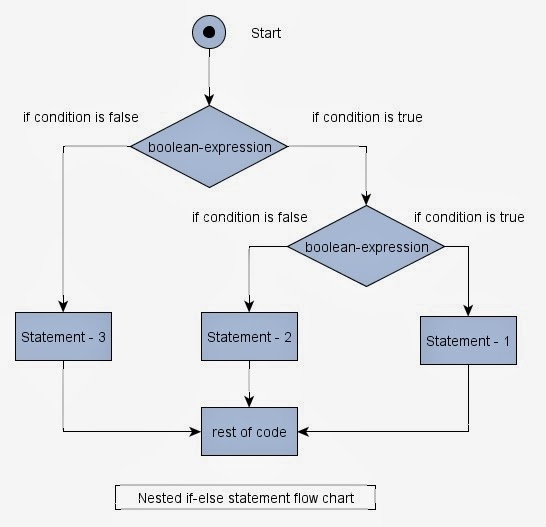
In While loop, the decision symbol is at the begin of the loop block and the loop doesn’t stop until the answer is no. The condition is first tested and then the block of code is executed if the test result is true. In DO-While loop, the decision is at the end of the loop block and makes obligatory to enter the loop at least one time. The code is first executed and then the condition is checked. The next iteration is executed if the test result is true.

Flowchart activities/homework
We practiced drawing some flowcharts as well. We drew the flowcharts for the pseudocode we wrote last week. We, as groups, also designed some posters of flowcharts to solve a problem that we have in daily life. Our group chose to solve the problem of “Do I Stay Up Late?”

Firstly, we ask the user if they have any task remained to be done that day. If the answer is no, then clearly they don’t need to stay up late. If the answer is yes, we designed a loop to calculate the total time required to finish the tasks. Then we ask the self-study time the user has the next time. If the time required to finish the tasks is less than or equal to the self-study time, we suggest the user study tomorrow. Otherwise, we ask the user if they will get up early tomorrow to study. If the answer is yes, we also suggest the user study tomorrow. If the answer is no, we ask the user if they will stay up late tomorrow. We designed another loop which keeps asking this question until the user promises that they won’t stay up late the next day. Then, we think they can/should stay up late.
 Catherine's Blog